
Is your Emirates ID still valid? It is a question worth asking before it becomes a problem, an expired card can quietly block bank transactions, visa services, and even your mobile line, not to mention the AED 20-per-day late fine (up to AED 1,000) for delayed renewal. An Emirates ID validity check takes less than five minutes on the official ICP portal, is completely free, and tells you exactly where you stand: valid, expiring soon, or already expired.
This guide shows you how to check Emirates ID status and validity online through the federal ICP portal and the mobile app, how to read the result, what the expiry and grace-period rules mean in practice, and what to do next in each case. No account is needed just to check, only your ID number or application details.
Why Check Your Emirates ID Validity?
Most people only think about their Emirates ID when someone asks for it. But validity affects more of your daily life in the UAE than almost any other document:
- Government services: visa renewals, driving licence services, and many portal transactions require a valid ID.
- Banking: banks periodically validate your ID; an expired card can trigger account restrictions until you update it.
- Telecom: SIM registrations are tied to your Emirates ID, an expired card can complicate new connections or number transfers.
- Travel: smart gates and immigration processes go smoother with a valid card.
- Fines: letting validity lapse exposes you to the late-renewal fine of AED 20 per day up to AED 1,000.
A quick validity check every few months, or a calendar reminder set a month before the expiry date printed on your card, costs nothing and prevents all of the above. Think of it the way you would a passport expiry check before booking flights.
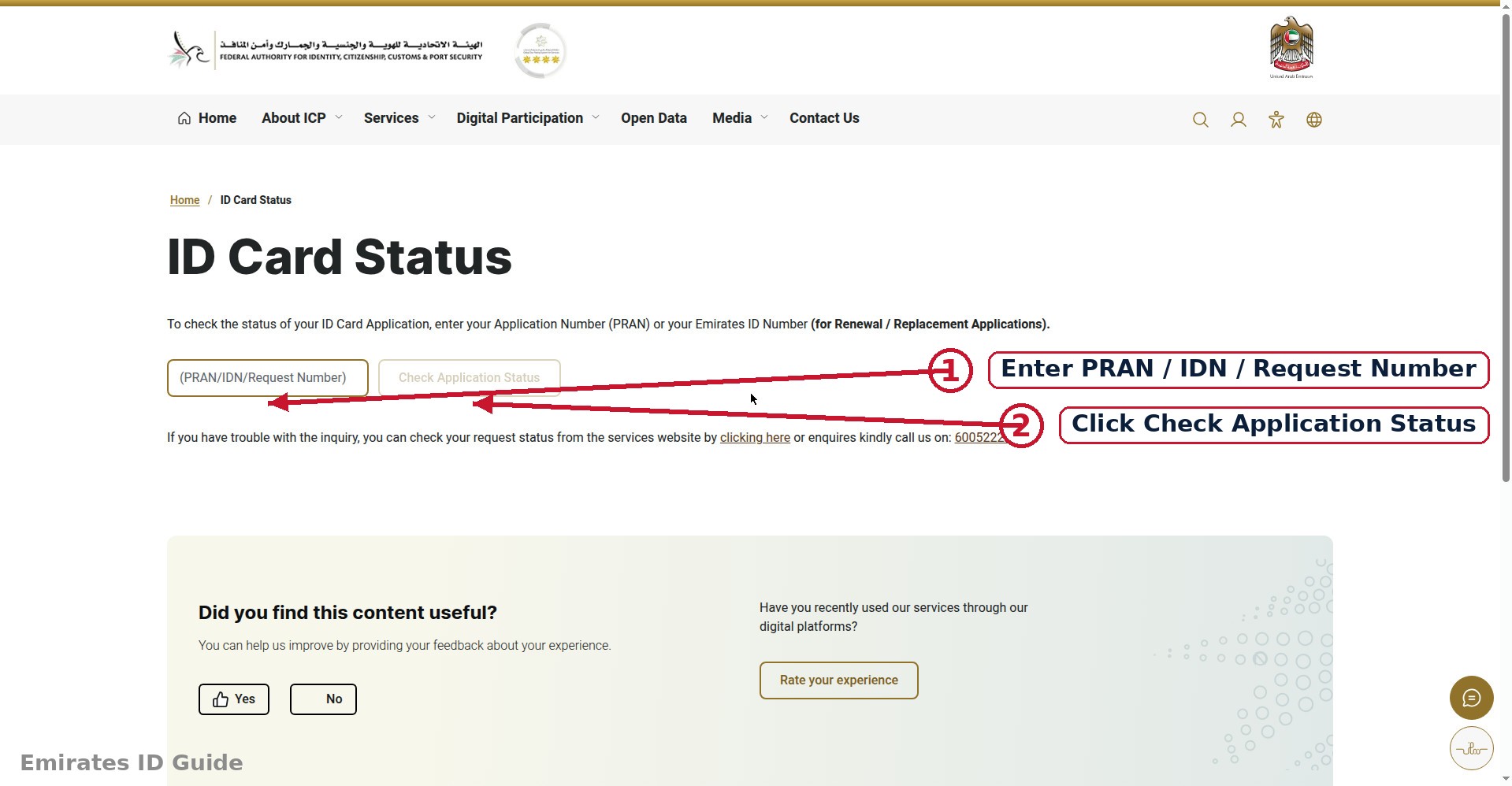
How to Check Validity on the ICP Portal (Step by Step)
The Federal Authority for Identity, Citizenship, Customs & Port Security (ICP) runs the national identity register, so icp.gov.ae is the authoritative place to verify your card. (GDRFA covers Dubai immigration matters and TAMM covers Abu Dhabi government services, for the ID card itself, ICP is the source of truth.)
- Open icp.gov.ae and navigate to the smart services or e-services area. Look for the Emirates ID status, validity, or application-tracking service, the exact label varies, so use the site search for "validity" or "status" if needed.
- Choose the status/validity service. Select the option to check Emirates ID card status or application status.
- Enter your details. Depending on the service, you will enter your Emirates ID number (the 15-digit number on the card) or your application/reference number. Some services also accept a passport or file number.
- Complete the verification. Enter the captcha or verification code shown, and submit. No login or account is required for a basic status check.
- Read your card status. The portal displays your card's current state along with key dates, see the next section on interpreting each possible result.
The whole process typically takes under five minutes. If the portal cannot find your record, double-check the ID number for typos, the most common cause of a "not found" result is a single mistyped digit.
Checking Validity via the Mobile App
Prefer your phone? The official ICP smart app (and the MOI UAE app) show your ID status after sign-in:
- Install the official ICP UAE app from the App Store or Google Play, verifying the developer name first.
- Sign in with UAE Pass, this links the app to your verified identity record.
- Open your digital ID or the Emirates ID services section. Your card's status and expiry date are displayed directly, often alongside a digital version of the card itself.
The app has one advantage over the website: once signed in with UAE Pass, your expiry date is always one tap away, and you can enable notifications so the app reminds you as renewal time approaches.
Understanding Your Result
The portal or app will show one of several statuses. Here is what each means and what to do:
| Status | What It Means | Your Next Step |
|---|---|---|
| Valid | Your card is active and within its validity period. | Note the expiry date; set a reminder 30 days before it. |
| Expiring soon | The expiry date is approaching (typically within weeks). | Start your renewal application now, see our renewal guide. |
| Expired | The validity period has ended. | Renew immediately; check whether any late fine has accrued. |
| Under renewal / in process | A renewal or replacement application is being processed. | Track it with your application number; no separate action needed. |
| Not found | The number entered does not match a record. | Re-enter carefully; if it persists, contact ICP with your documents. |
Expiry, grace period, and fines, how they connect
When your card passes its expiry date, the clock starts on renewal urgency. The standard late-renewal penalty is AED 20 per day up to a maximum of AED 1,000. In practice, a grace period of around 30 days after expiry is commonly observed before the daily fine begins accruing, treat this as a guideline and confirm current rules on icp.gov.ae. Either way, the message is the same: do not let an expired card sit. A renewal application costs far less than the maximum fine.
What to Do If Your ID Is Expiring or Expired
If it is expiring soon
- Gather your valid passport and a recent compliant photo.
- Apply for renewal on icp.gov.ae or the mobile app, following our step-by-step renewal guide.
- Save your application number and track the status until the new card is delivered.
If it has already expired
- Run an Emirates ID fine check first, so you know whether late fines are already on your record.
- Apply for renewal immediately through the ICP portal or a typing center.
- Pay any accrued fine together with the renewal fees at checkout.
- Keep the receipt and application number until the new card arrives.
In both cases, keep using your current card (or your UAE Pass digital identity) as identification until the replacement arrives, and update your bank and telecom provider with the new card details once you receive it, since many institutions re-validate periodically.
How Long Is an Emirates ID Valid?
Validity is not one-size-fits-all, it depends on your residency category:
- Expatriate residents: card validity is linked to the residency visa. When the visa is issued for two years, the Emirates ID is generally issued for the same period; renew the visa and the ID follows. This is why visa-renewal time is also ID-renewal time for most residents.
- UAE citizens: typically receive cards with longer validity periods, often five years or more, since their residency status does not expire.
- GCC nationals and special categories: validity follows the underlying residence documentation, the portal confirms your specific period when you apply.
- Children: minors also hold Emirates IDs with validity tied to the sponsoring parent's visa cycle.
The practical takeaway: whenever your visa situation changes, new job, visa renewal, change of sponsor, check your ID validity too. The two documents move together, and it is easy to renew one and forget the other. A single validity check after any visa event keeps both aligned.
Common Problems When Checking Validity (and Fixes)
The validity check usually works first try, but here are the hiccups people run into:
- "Record not found." Almost always a typo in the 15-digit ID number. Re-enter it slowly, digit by digit, exactly as printed on the card, including the dashes in the right places if the form expects them.
- Page will not load or times out. Government portals occasionally undergo maintenance, usually announced on the site. Wait an hour and retry, or switch to the mobile app, which often runs on separate infrastructure.
- Details do not match your card. If the portal shows a different name spelling or an unexpected expiry date, do not ignore it, the printed card is produced from this same record. Visit a typing center or ICP service center with your passport to get the record corrected before it causes problems elsewhere.
- Recently renewed but status has not updated. Status changes can take a short while to propagate after approval and printing. If your application was approved days ago and the status still looks stale, track it with your application number rather than the card number, or contact ICP customer service.
- Captcha keeps failing. Refresh the code and enter it carefully; captchas are case-sensitive on some portal versions. The mobile app's UAE Pass sign-in bypasses captchas entirely.
Frequently Asked Questions
How can I check my Emirates ID validity online?
Go to icp.gov.ae, open the Emirates ID status/validity service, enter your 15-digit Emirates ID number, complete the verification, and submit. The portal shows your card's current status and expiry date. No login is required for a basic check.
Where is the expiry date on the Emirates ID?
It is printed on the front of the physical card. It is also visible in the UAE Pass app and the ICP smart app after you sign in, and through the online validity check described above.
What happens if my Emirates ID expires?
Government and banking services that require a valid ID may be refused or restricted, and late renewal attracts a fine of AED 20 per day up to AED 1,000. Renew as soon as possible, the renewal itself is quick and mostly online.
Is there a grace period after expiry?
A grace period of around 30 days after expiry is commonly observed before daily fines start accruing, but this is a guideline, not a guarantee. Confirm the current rule on icp.gov.ae and renew promptly rather than relying on the grace period.
Can I check someone else's Emirates ID validity?
Status services are designed for checking your own record using your own ID or application number. For family members (such as children), the sponsor or guardian can typically check through their own verified account, follow the portal's guidance for your situation.
How often should I check my ID validity?
A quick check every few months is plenty, plus a calendar reminder set 30 days before the expiry date on your card. If you use the ICP app with notifications enabled, it can remind you automatically.
Conclusion
An Emirates ID validity check is free, takes minutes, and prevents the cascade of problems an expired card causes, from blocked services to daily fines. Make it a habit: check on icp.gov.ae or the app, note your expiry date, and act early when renewal time approaches.
Next steps: follow our Emirates ID renewal guide when your card is nearing expiry, review the complete fee breakdown before you pay, or run an Emirates ID fine check to make sure your record is clean.