Once your Emirates ID application reaches the "dispatched" stage, the card is handed to a courier, usually Emirates Post, and from that moment you can use Emirates ID tracking to follow the parcel all the way to your doorstep. All you need is the tracking (AWB) number, which normally arrives by SMS on your registered mobile number.
In this guide you'll learn how to track Emirates ID step by step on the Emirates Post website and the ICP portal, what the typical delivery timeframes are, what every delivery status message means, and exactly what to do if the courier misses you or the card never arrives.
Table of Contents
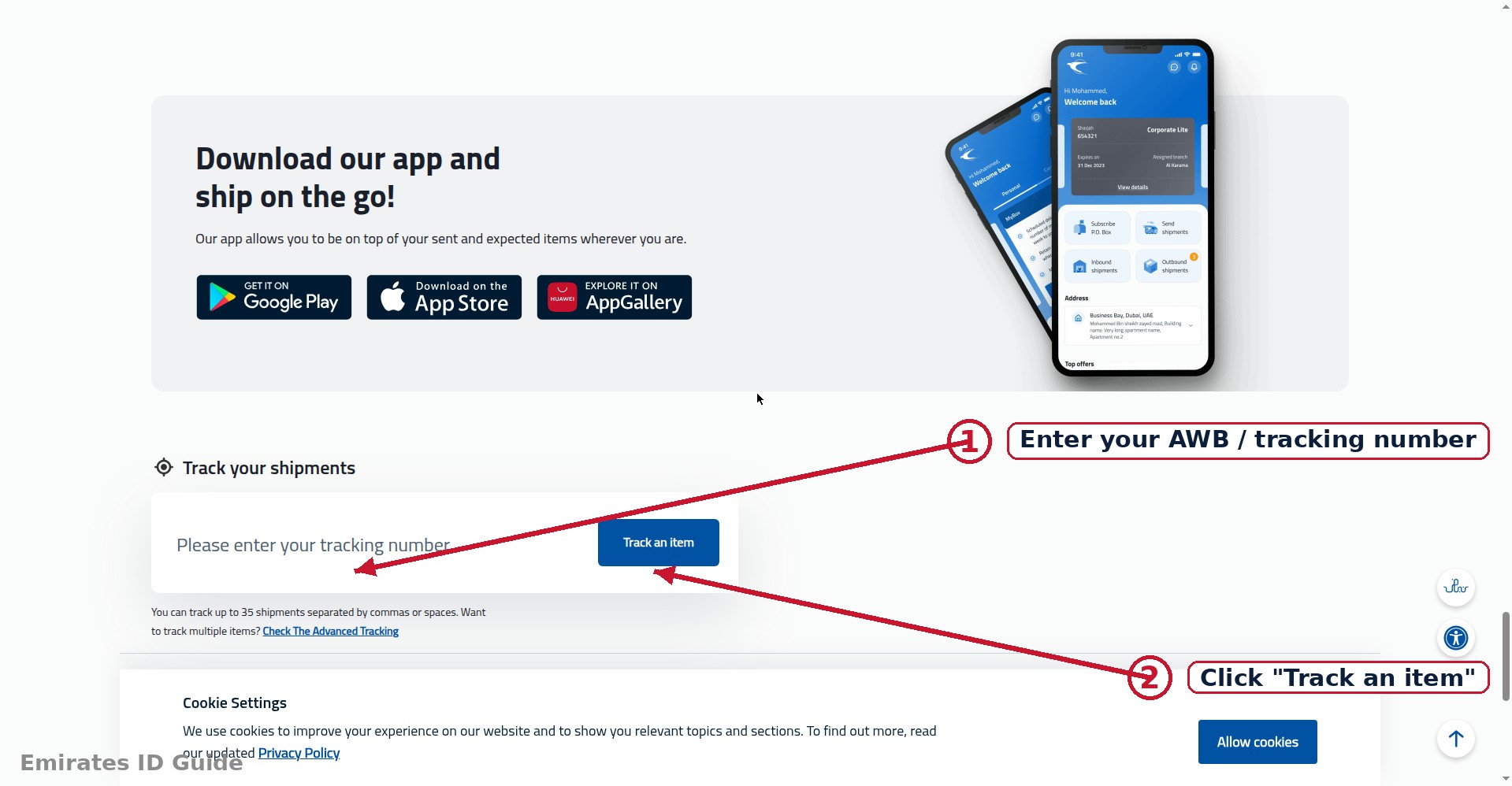
How to Track via Emirates Post (AWB Number)
Emirates Post is the national courier that delivers most Emirates ID cards. When your card is dispatched, the system sends an SMS to the mobile number registered on your application containing an AWB (air waybill) tracking number. That number is your key to track Emirates ID delivery in real time.
- Find your AWB number. Check your SMS inbox for a message from Emirates Post (or from ICP) sent after your application status changed to "dispatched." The message contains a tracking/AWB number, keep it safe. If you can't find the SMS, see the FAQs below.
- Open the Emirates Post tracking page. Go to the official Emirates Post website (emiratespost.ae) and look for the "Track & Trace" or parcel tracking tool, usually prominent on the homepage.
- Enter the AWB number. Type or paste the tracking number exactly as shown in the SMS, then submit.
- Read the tracking timeline. You'll see a chronological list of scans: when the parcel was received by the courier, when it reached the sorting facility, when it went out for delivery, and the final delivery or collection event.
- Check back for updates. Scans typically update at each handoff, sorting, loading onto the delivery vehicle, and delivery attempt. Checking once or twice a day is enough.
Tip: the AWB number sometimes arrives a few hours after the status first changes to "dispatched." If your status just flipped, give the SMS a little time before worrying.
Tracking on the ICP Portal
You can also follow delivery progress from the federal side. The ICP portal's application status service (the same one used for the Emirates ID status check) continues to update after dispatch:
- Open the ICP website (icp.gov.ae) and go to the Emirates ID application status/inquiry service.
- Enter your application/PRAN number, Emirates ID number, or passport number.
- Submit the form and read the current stage. After dispatch, the status typically moves from "dispatched" to "delivered" or "ready for collection" once the courier completes its part.
The ICP view is less granular than the courier's own tracking, it won't show "out for delivery" scans, but it's a useful cross-check. If ICP says "delivered" and you received nothing, that discrepancy is exactly what you take to customer service (see missed delivery).
Emirates ID Delivery Timeframes
How long does delivery take once dispatched? For most applicants, the card arrives within a few working days. The table below shows typical timeframes for each stage after your application is approved.
| Stage | Typical Timeframe | Notes |
|---|---|---|
| Approval → printing | 2–5 working days | Card production at the central facility |
| Printing → dispatch | 1–3 working days | Handover to the courier; AWB SMS follows |
| Dispatch → delivery | 2–4 working days | Up to 7 during peak periods or public holidays |
| Total after approval | About 1–2 weeks | Remote areas can take slightly longer |
These are typical ranges, not guarantees. If your card was dispatched more than 7 working days ago with no delivery and no tracking movement, treat it as an exception and follow the missed delivery steps.
Delivery Status Messages Explained
Courier tracking pages show scan events that can read like code. Here are the messages Emirates ID applicants most often see, and what each one means for you.
Shipment received / accepted at origin
The courier has the parcel. Your card has left the printing facility. Action: none, delivery is now in the courier's hands.
Arrived at sorting facility / in transit
The parcel is moving through the courier's network toward your emirate or city. Action: none; this is normal mid-journey movement.
Out for delivery
The card is on the delivery vehicle and should reach you today. Action: keep your phone nearby, the courier may call for directions, and make sure someone is available at the delivery address.
Delivered
The parcel was handed over and signed for. Action: if you didn't receive it, check with family members, building reception, or neighbors first, then contact the courier with your AWB number.
Delivery attempted / consignee not available
The courier came but no one answered. Action: the courier usually retries or leaves instructions. If a second attempt also fails, the parcel goes to a branch for collection, see below.
Held at branch / ready for collection
Your card is waiting at a courier branch or service point. Action: collect it in person with your receipt and an ID document. Note any collection deadline in the notice.
Returned to sender
Delivery failed repeatedly or the address was undeliverable, so the card went back. Action: contact ICP customer service to arrange re-dispatch, don't just wait.
Missed Delivery and Branch Collection
A missed delivery is the most common Emirates ID delivery problem, and it's almost always fixable. Follow these steps in order:
- Check the tracking timeline first. Confirm whether it says "delivery attempted" (a retry is likely) or "held at branch" (go collect it).
- Watch for the courier's SMS or call. After a failed attempt, Emirates Post typically sends instructions, a new delivery date or the branch address for collection.
- Collect from the branch if instructed. Bring your application receipt (with the PRAN number), your passport or existing Emirates ID, and the AWB/tracking number. Some branches ask for the SMS itself, so don't delete it.
- Ask about authorization. If you can't go yourself, ask the branch whether a family member can collect on your behalf and what authorization they need, policies vary, so confirm before sending someone.
- Escalate if the parcel goes quiet. If tracking shows no movement for several working days after a failed attempt, call Emirates Post customer service with your AWB number. If the card was returned to sender, contact ICP to arrange re-dispatch to a corrected address.
Prevention tip for next time: the single biggest cause of failed Emirates ID deliveries is an outdated mobile number or address on the application. When you apply or renew, double-check both, the courier can only reach the contact details the authority has.
How to Track Emirates ID Without the AWB Number
Lost the SMS, changed your number, or never received a tracking reference? You still have options for Emirates ID tracking without the AWB number, they're just less detailed than the courier's own scan timeline.
- Use the ICP portal status. The federal application status service moves from "dispatched" to "delivered" (or "ready for collection") as the courier completes its leg. It won't show "out for delivery," but it confirms the big milestones. You'll need your application/PRAN number, Emirates ID number, or passport number.
- Call Emirates Post with your application reference. Customer service can often locate the parcel using the PRAN/application number or your Emirates ID number, even without the AWB, have your receipt and an ID document ready when you call.
- Visit a branch with your receipt. As a last resort, an Emirates Post branch can search by name and ID details. Bring your application receipt and passport.
One caution: without the AWB number you can't see granular scans, so treat the ICP "delivered" flag as your signal to start asking around the household and reception, and if the card isn't with anyone you know, escalate to the courier the same day rather than waiting.
Frequently Asked Questions
I never received the SMS with the tracking number. What now?
First, confirm your application status actually shows "dispatched", the SMS only goes out after dispatch. Then check that the mobile number on your application is correct and active, and look in your spam/junk SMS folder. If 48 hours have passed since dispatch with no SMS, call Emirates Post with your application/PRAN number, or check the ICP portal, which sometimes displays the tracking reference.
My AWB tracking number isn't working on the Emirates Post website. Why?
The most common reason is timing, the number can take a few hours to activate in the courier's system after dispatch. Re-enter it carefully (it's easy to confuse 0/O and 1/I). If it still fails after 24 hours, contact Emirates Post customer service with your application reference.
How long does Emirates ID delivery take in total?
From dispatch, most cards arrive within 2–4 working days, and up to 7 during busy periods. From application approval to card in hand, expect roughly one to two weeks in total.
Can someone else receive my Emirates ID on my behalf?
Couriers generally hand the card to whoever is at the registered address, but branch collection usually requires the applicant's own documents. If you can't collect personally, confirm the branch's authorization policy before sending a family member.
What if I moved after applying? Can I change the delivery address?
Address changes mid-process are difficult once the card is dispatched. Contact ICP customer service as early as possible, if the parcel hasn't left the facility, they may be able to update it; otherwise, you'll likely need to collect from the branch or arrange re-dispatch.
The tracking says "delivered" but I never got my card. What should I do?
Check with everyone at the delivery address, building reception, and nearby neighbors, cards are sometimes signed for by others. If it's genuinely missing, contact Emirates Post immediately with your AWB number to trace the delivery scan, and inform ICP if the courier can't resolve it.
Conclusion
Emirates ID tracking is straightforward once you have the AWB number: enter it on the Emirates Post tracking page, follow the scans from dispatch to delivery, and act quickly if you see a failed attempt or a branch-hold message. Keep your registered mobile number active, don't delete the tracking SMS, and collect promptly if the card ends up at a branch.
Next steps: still waiting for dispatch? Go back to the Emirates ID status check guide to see where your application stands. Need the card's details on your phone right now? Learn how to download your Emirates ID online.