After you apply for a new Emirates ID or submit a renewal, the waiting begins, and the fastest way to end the uncertainty is an Emirates ID status check online. Whether your application was filed at an ICP service center, through an Amer center, or by a typing center on your behalf, you can follow its progress from your phone or computer without visiting any office.
This guide shows you exactly how to check Emirates ID status using the official federal portal, the mobile app, and even your passport number if you don't have the application reference. You'll also find every common application status message explained in plain language, plus what to do when your status seems stuck.
Table of Contents
- How to Check Emirates ID Status on the ICP Website
- How to Check Status Using the Mobile App
- How to Check Emirates ID Status With Passport Number
- Emirates ID Application Status Messages Explained
- Status Check Methods Compared
- What to Do If Your Status Is Stuck
- How Often Should You Check Your Status?
- Frequently Asked Questions
How to Check Emirates ID Status on the ICP Website
The ICP portal (Federal Authority for Identity, Citizenship, Customs & Port Security, at icp.gov.ae) is the federal authority that issues Emirates IDs, so its website is the primary and most reliable place for an Emirates ID status check online. It works for applications from every emirate, Dubai, Abu Dhabi, Sharjah, Ajman, Ras Al Khaimah, Fujairah, and Umm Al Quwain, because ICP is the federal body, not an emirate-level department.
A quick note on other portals: you may see guides recommending GDRFA or TAMM for status checks. GDRFA (General Directorate of Residency and Foreigners Affairs) is Dubai-specific, and TAMM is Abu Dhabi-specific. They are fine alternatives if you applied in those emirates, but for a status check that works everywhere in the UAE, start with ICP.
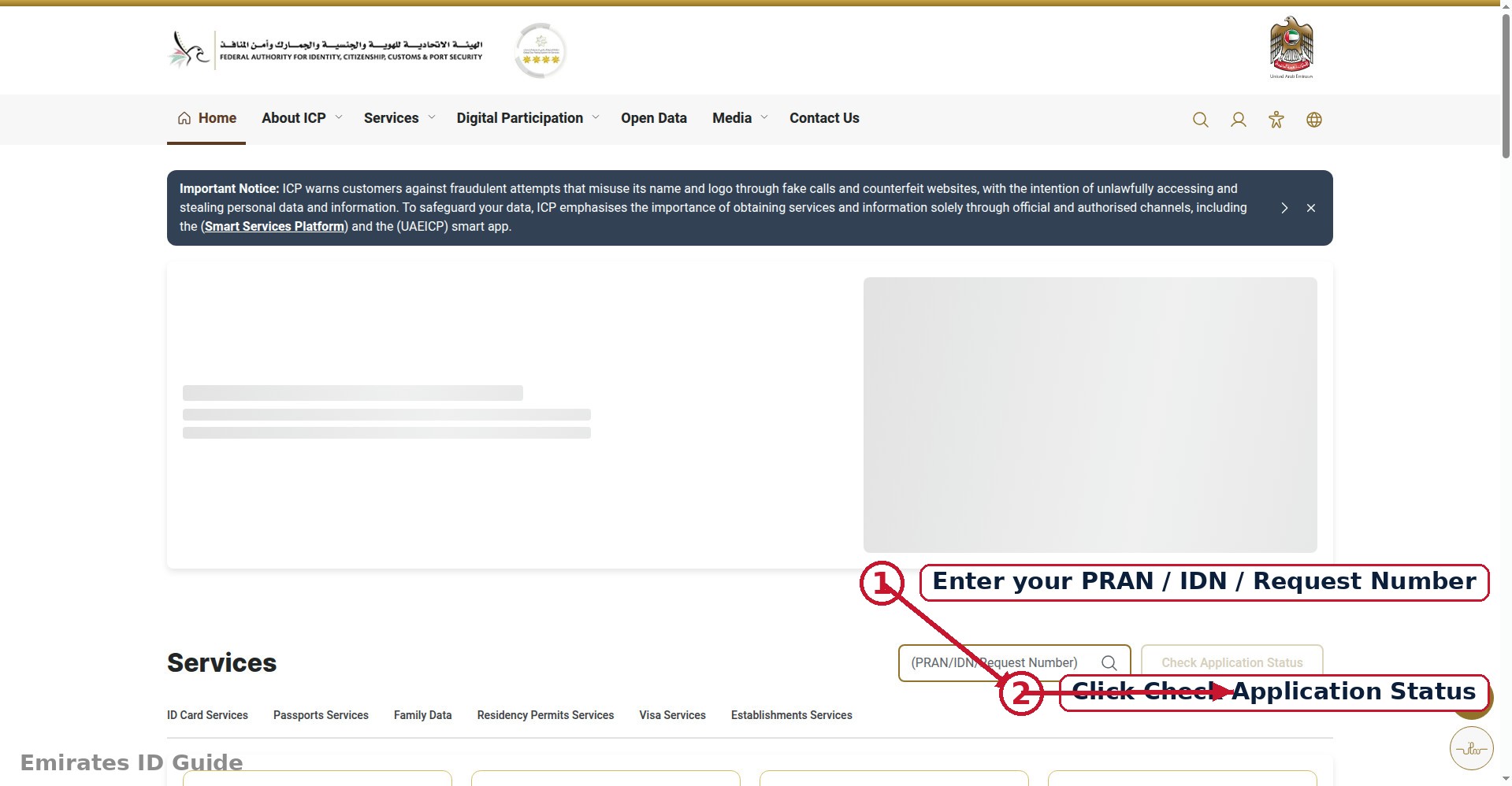
- Go to the ICP website. Open icp.gov.ae in your browser, it works on mobile and desktop, in English and Arabic. Look for the services or "inquiry" section for identity services.
- Find the application status service. ICP offers an application tracking/inquiry service for Emirates ID. Select it from the list of e-services.
- Enter your reference details. You can usually search with your application number (PRAN), the reference printed on the receipt you received when you applied, or with your Emirates ID number for renewals. Type it carefully; a single wrong digit returns no result.
- Complete the verification. Enter the captcha or verification code shown on screen, then submit the form.
- Read your status. Your current application stage appears instantly, often with a short description and the date of the last update. (See the status messages explained section below to understand what each one means.)
Tip: keep your application receipt until the card is in your hands. The PRAN/application number on it is the fastest key for every future status check.
How to Check Status Using the Mobile App
If you prefer your phone, the official smart app gives you the same check Emirates ID status service with a few extra conveniences, such as saved applications and push-style updates. The app is free on iOS and Android.
- Download the official app. Install the UAE ICP smart app (published by the Federal Authority for Identity) from the Apple App Store or Google Play Store. Double-check the publisher name before installing, only use the official government app.
- Open the app and choose your language. English and Arabic are both supported.
- Go to the inquiry / tracking section. Look for Emirates ID services, then the application status or tracking option.
- Enter your application or ID number. As on the website, your PRAN or Emirates ID number pulls up the current stage of your application.
Logging in with UAE Pass (the UAE's national digital identity) unlocks a personalized dashboard where your applications, documents, and linked services appear automatically, useful if you check status often or manage family applications.
How to Check Emirates ID Status With Passport Number
Lost your receipt, or never received an application number? You can still run an Emirates ID status check using your passport number. The ICP system links your passport to your identity file, so it works as an alternative search key.
- Open the ICP website's application status service as described above.
- When asked for the search reference, choose the passport number option (or the "file number" option if you have it).
- Enter your passport number exactly as printed, including any leading zeros, plus your nationality if requested.
- Complete the captcha and submit to view your status.
If the passport search returns nothing, the most common causes are a typo in the number, a very recent application that hasn't entered the system yet (allow 24–48 hours), or an application filed under a different passport (for example, after a passport renewal, try the old number, or use the Emirates ID/file number instead).
Emirates ID Application Status Messages Explained
The portal shows short status labels that aren't always self-explanatory. Here are the messages applicants most commonly see, in the order they usually appear, with what each one means and what (if anything) you need to do.
1. Application Received / Under Process
Your application is in the system and waiting for initial review. Nothing is wrong, this is the normal first stage. Action: none; check again in a few days.
2. Approved
Your application has passed review and been accepted. The card moves to production next. Action: none; printing usually follows within a few working days.
3. Printed / Card Printed
Your physical Emirates ID card has been produced. It now moves to dispatch and delivery. Action: none, but this is a good time to make sure your registered mobile number and delivery address are correct, since the courier uses them.
4. Dispatched / In Delivery
The card has been handed to the courier (Emirates Post in most cases). Action: watch for an SMS with tracking details, and read our Emirates ID delivery tracking guide to follow the parcel.
5. Delivered / Ready for Collection
Either the courier delivered the card, or it's waiting for you at a designated branch or service center. Action: collect it promptly and bring your receipt or existing ID for verification.
6. Returned / On Hold
Something needs attention, commonly a failed delivery attempt, an unclear address, or a document the authority is waiting for. Action: don't ignore this one; contact ICP customer service or visit the service center shown in the status details.
Note: the exact wording on the portal can vary slightly ("In Progress" vs "Under Process", for example). The sequence above, received, approved, printed, dispatched, delivered, is the standard flow regardless of wording.
Status Check Methods Compared
| Method | What You Need | Login Required | Best For |
|---|---|---|---|
| ICP website | Application/PRAN number, Emirates ID, file, or passport number | No | Everyone, works for all emirates |
| ICP mobile app | Same as website | No (UAE Pass optional) | Checking on the go; saved applications |
| GDRFA website | Application details | No | Dubai-issued applications only |
| TAMM | Application details | Usually yes | Abu Dhabi-issued applications only |
| ICP service center | Receipt or ID document | N/A (in person) | Complex cases or "on hold" statuses |
What to Do If Your Status Is Stuck
Most applications move through the stages above within one to two weeks, but sometimes a status doesn't change for a long time. Before worrying, run through this checklist:
- Allow normal processing time. "Under Process" for 5–10 working days is routine, especially during busy periods. Only treat it as stuck after about two weeks with no movement.
- Verify you're checking the right reference. A mistyped PRAN returns a stale or empty result. Re-enter the number from your receipt carefully.
- Check for an "on hold" or "returned" flag. These mean the authority needs something from you, usually an additional document or a corrected detail. The status details or an SMS usually say what.
- Confirm your contact details. Missed SMS notifications are a common reason people think nothing is happening. Make sure the mobile number on your application is active and correct.
- Contact ICP support. If the status hasn't moved for over two weeks and shows no hold flag, call the ICP helpline or visit a customer happiness center with your receipt. Bring your passport and application reference.
- Check related holds. Unpaid fines linked to your identity can occasionally block issuance. If everything else looks fine, run an Emirates ID fine check to rule this out.
How Often Should You Check Your Status?
For most applicants, checking once every few days is plenty, the stages move in multi-day steps, so checking ten times a day won't make the card arrive faster. A practical rhythm: check once 48 hours after applying (to confirm the application entered the system), then every 3–4 days until you see "printed," and daily once it shows "dispatched," since that's when the courier handoff happens and the tracking SMS can arrive at any time.
If you applied through an employer or a typing center, ask them for the application number on the day of submission. Many "my status isn't updating" worries turn out to be someone checking with the wrong reference, or checking a renewal under an old application number. One correct reference, checked calmly every few days, is the whole system.
Frequently Asked Questions
How long does it take for Emirates ID status to update after applying?
Allow 24–48 hours for a new application to appear in the online system. After that, status changes typically reflect each completed stage, approval, printing, and dispatch, within a few working days of each other.
Can I check my Emirates ID status without the application number?
Yes. You can search with your Emirates ID number (for renewals), your file number, or your passport number. The application/PRAN number is simply the fastest and most precise option.
My status says "approved", how long until the card is printed?
Printing usually follows approval within a few working days. If "approved" hasn't changed for more than a week, re-check with the exact reference from your receipt, then contact ICP support if it persists.
The status shows "dispatched" but nothing has arrived. What should I do?
"Dispatched" means the card is with the courier. Look for the tracking SMS from Emirates Post and follow the steps in our delivery tracking guide. If several days pass with no SMS, contact the courier with your application reference.
Is there a fee for checking Emirates ID status online?
No. Checking your application status on the ICP website or app is completely free. Never pay a third-party website for a status check, the official service costs nothing.
Can someone else check my application status for me?
Technically yes, since the basic search only needs the reference number, but share it only with people you trust, such as a family member or your company's PRO. Your application number is linked to your identity details.
Conclusion
An Emirates ID status check takes less than five minutes and removes all the guesswork from waiting for your card. Use the ICP website as your primary method, it's federal, free, and covers every emirate, keep your application receipt safe, and follow the status sequence from received to delivered.
Next steps: once your status shows "dispatched," head to our Emirates ID delivery tracking guide to follow the parcel to your door. Need a digital copy while you wait? See how to download your Emirates ID online. To confirm your health cover as well, read how to check medical insurance status with Emirates ID.